Move all your iPhone photos to your PC
The first 20 GB over the cable are free: photos and videos in original quality, each one verified.
The download opens soon · Windows 10 and 11 · 20 GB free, no credit cardWindows 10 and 11 · 20 GB free, no credit cardThis computer seems to run Windows 7 or 8. The program needs Windows 10 or 11.There is no Mac version yet. The program runs on Windows 10 or 11.The program runs on a Windows computer. Send the address to it.



Drag across the screen. With “Optimize iPhone Storage” turned on, your iPhone keeps a smaller version and leaves the original in iCloud. The program fetches the original. Illustrative photo.
If you've tried, you know this
What people write when they try to move their iPhone photos to Windows, with a link to where it came from. Quotes from Brazilian sites are translated from Portuguese.
Fear of losing your photos
“What's the point of paying if my photos aren't safe? I lost the photos from my first plane trip”Reclame Aqui, 2025, in Portuguese(opens in a new tab)
It stops halfway through
“The Photos app freezes while it's counting how many photos and videos there are”Microsoft Learn, 2020, in Portuguese(opens in a new tab)
iCloud for Windows won't download
“I installed iCloud on Windows 10, but not a single file downloads, the folder just sits there empty”MacMagazine forum, in Portuguese(opens in a new tab)
The whole library doesn't show up
With iCloud Photos turned on, some originals stay only in the cloud, and Windows can't see them over the cable.
Apple Support(opens in a new tab)The PC can't find the iPhone
“A few times Windows said the device was busy or the device was unreachable”PocketPC forum, in Portuguese(opens in a new tab)
The HEIC photo won't open
“Convert iPhone HEIC photos saved on the PC to JPEG and PNG”Apple Community, in Portuguese(opens in a new tab)
Photos arrive with gray patches
Portrait mode and edited photos arrive with gray areas when the iPhone converts the file during the transfer.
Reddit(opens in a new tab)As safe and simple as the iPhone itself
Every problem has its own color, and every color has its own answer.
Your own copy, verified file by file
On your own drive, with no cloud subscription needed. The report tells you up to what date everything is saved.
- Each file exactly as the iPhone saved it, with no conversion along the way
- Every file read back from the drive and compared
- Cancel anytime: your plan stays valid until the end of what you paid
0 failuresin 70,179 files verified, one by one
Answers: fear of losing your photos · software that charges you every year · photos arrive with gray patches
It doesn't stop halfway
If the cable comes loose, it waits for the iPhone to come back and picks up from the last verified file.
- Checks for the app that connects the iPhone and shows you where to get it
Answers: it stops halfway through · the PC can't find the iPhone
Cable and iCloud at the same time
From iCloud it only pulls what isn't on the iPhone, straight to the drive you choose.
12.4 MB/sover the cable, verifying every file
Answers: iCloud for Windows won't download · hours and hours over the cable
Your whole library in one folder
What's on the iPhone and what's only in iCloud arrive together, as originals.
14,089of the 34,387 items were only in iCloud
Answers: the whole library doesn't show up
Plug in, tap Trust, done
The original HEIC, just as the iPhone saved it, plus JPG and MP4 copies whenever you want them.
Answers: the HEIC photo won't open
Numbers from our test copy on an iPhone 14 Plus with iOS 26.5, on September 25, 2026.
What happens to your iPhone
Nothing on your iPhone or in iCloud is deleted or changed unless you ask.
You don't need
- iTunes
- an app on your iPhone
- uploading to the cloud
- a HEIC converter
Step 1: You plug in the cable and tap Trust
Your iPhone asks whether to trust this computer. The connection uses Apple's free Apple Devices app from the Microsoft Store.
1 tap on “Trust”, on your iPhone screen
Step 2: It counts everything there is
It reads your iPhone's catalog: how many photos, how many videos, and which ones are only in iCloud. That's the count the report checks at the end.
34,387 photos and videos counted in the test
Step 3: It copies over the cable, in the original
HEIC, HEVC, Live Photos and edited versions, organized by date on the drive you choose. If the cable comes loose, it picks up where it left off.
20,298 files copied over the cable
Step 4: It fetches from iCloud only what's missing
You sign in with your password and the 6-digit code. Your password isn't stored, and fetching doesn't delete or change anything in iCloud.
14,089 were only in iCloud and got downloaded
Step 5: It checks, then tells you: safe to reset
Every file is read back from the drive and compared. The report shows up to what date everything is saved, and what's missing, if anything is. If you like, it emails you when the copy is done and your iPhone is safe to reset.
0 files with errors in the final report
- Numbers from a test on an iPhone 14 Plus with iOS 26.5, on September 25, 2026.
Sorted by month, not in 114APPLE
Each photo goes into the year and month it was taken, with the date and time in the file name.
“… you never know which one the photo will be in”
Adrenaline forum, 2019, in Portuguese(opens in a new tab)
- DCIM
- 100APPLE
- 101APPLE
- 110APPLE
- 114APPLE
- IMG_4921.HEIC
- IMG_4921.MOV
- 2024
- 2024-04 Abril
- 2024-05 Maio
- 2024-05-28 08.00.00 IMG_4921.HEIC
- 2024-05-28 08.00.00 IMG_4921.MOV
- 2024-06 Junho
Example with a Live Photo from May 28, 2024: the photo and its video, side by side.
A toolbox for your whole iPhone
Photos are just the start. Backup, chats, apps and diagnostics open in the same window, sorted by theme.
Photos
- Copy by cableEverything from the iPhone to the folder, in one buttonSee the guide
- From iCloudThe photos that are only in the cloud, in the originalSee the guide
- GalleryWhat's already saved on this computerSee the guide
- Photos on the iPhoneSee what's on the device before copyingSee the guide
- Report and receiptCheck everything and create the PDF receiptSee the guide
Media
- Compatible copiesHEIC to JPG and HEVC to MP4, the original untouched
- Duplicates and spaceFind the duplicates in the folder and free up spaceSee the guide
- Reorganize foldersMove saved photos to other folders, with preview and undoSee the guide
- Ringtones and conversionMake ringtones and convert audio and video
- Music and booksMusic, books and ringtones from the iPhone to the computer
Device
Data
Diagnostics
- Connection diagnosticsA read-only report to send to supportSee the guide
- Check the computerWindows, the Apple driver and what is missingSee the guide
- iPhone diagnosticsThe live log of what the iPhone is doing
- Crash reportsThe iPhone's crash reports, read only
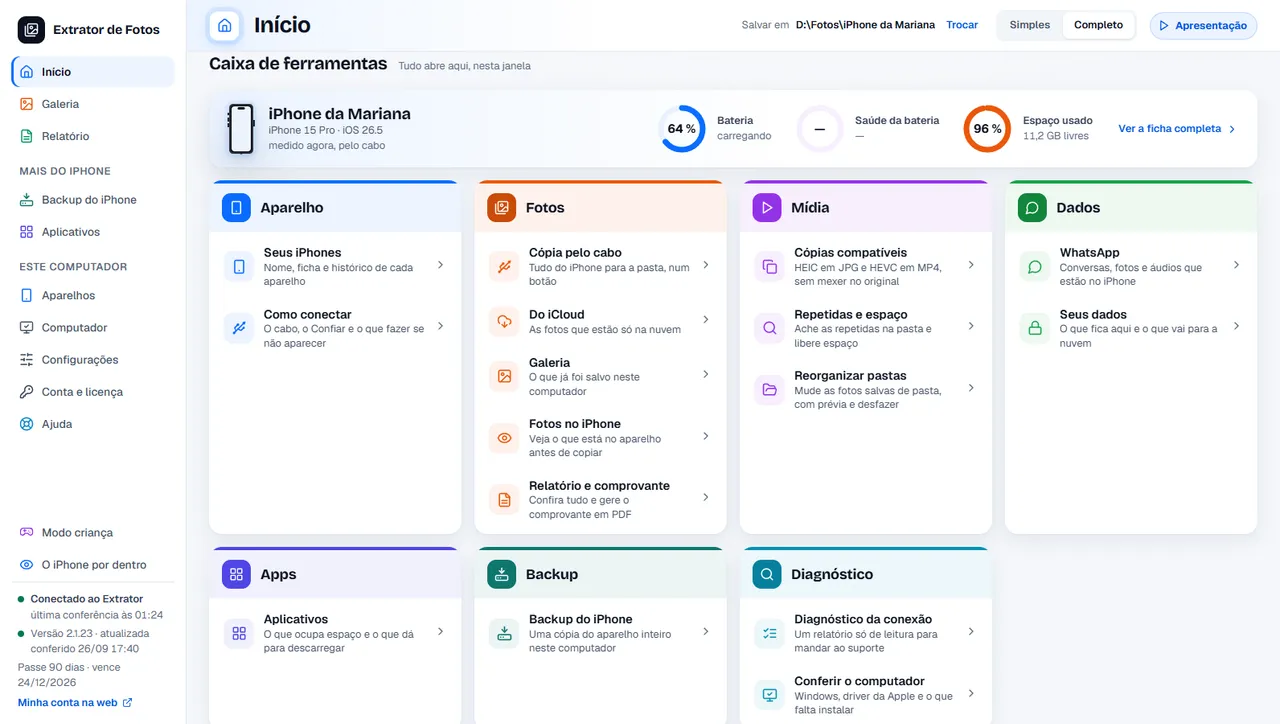
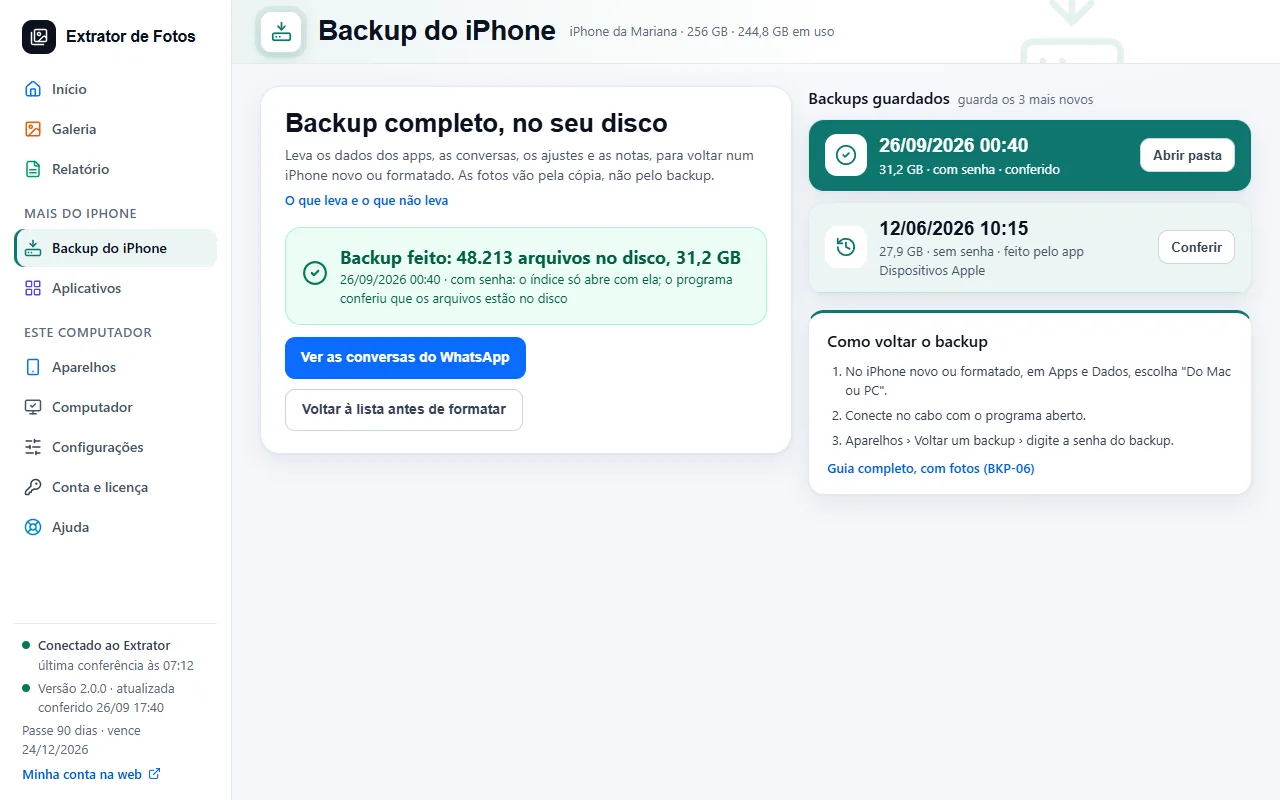
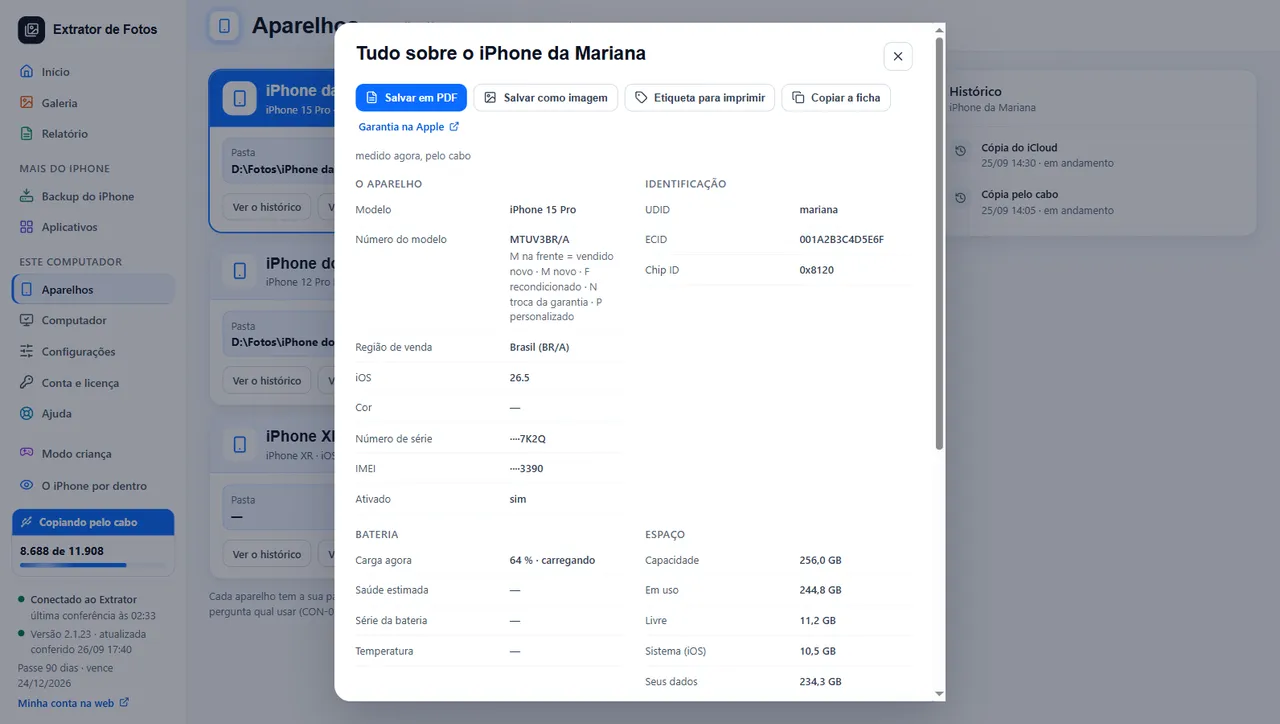
Program screens shown in Portuguese, with sample data. The program also comes in English.
Your photos never pass through us
They go from your iPhone and iCloud straight to your computer. What we do online is check your license and count your plan's space.
Nothing changes unless you ask
Copying and checking never delete or change anything on your iPhone or in iCloud. You decide whether to erase your iPhone, after you see the report.
Your iCloud password isn't stored
You type it into the program, it signs in and downloads. The password is never saved or sent to us.
We never see your photos
Not your photos, not your videos, not anything on your iPhone. The error reports the program sends carry no file names, no photos and no email.
Your data, whenever you want it
In the customer area you can download a copy of your data or delete your account.
7 days to change your mind
Bought it and not happy? Up to 7 days after your purchase, you get all your money back.
What each option does
Checked on September 25, 2026, with Windows 11 and iOS 26. Only what can be tested makes the list.
Gets the photos off your iPhone and onto your computer
- File Explorer
- yes
- Apple's app
- no: the Photos tab only sends from the computer to the iPhone
- Extrator de Fotos
- yes
Keeps the original format (HEIC, HEVC)
- File Explorer
- depends on a setting on the iPhone
- Apple's app
- not applicable
- Extrator de Fotos
- yes, always
Brings over the ones only in iCloud, in original quality
- File Explorer
- no
- Apple's app
- no
- Extrator de Fotos
- yes
Picks up on its own if the cable comes loose
- File Explorer
- no
- Apple's app
- not applicable
- Extrator de Fotos
- yes
Checks every file and tells you when it's safe to erase
- File Explorer
- no
- Apple's app
- no
- Extrator de Fotos
- yes
Full iPhone backup
- File Explorer
- no
- Apple's app
- yes, on the C: drive
- Extrator de Fotos
- yes, on the drive you choose
A clear price, with the renewal spelled out
The price is per month, and how it renews is written right next to it. You see what the plan includes before you pay.
Everything included, on every complete plan
- Unlimited transfers
- Unlimited iPhones and iPads
- Photos that only live in iCloud, in the original
- Every file checked before you delete it from the iPhone
Questions before you erase your iPhone
Don't see yours? The help center has an article for every known issue.
Will it delete anything from my iPhone or iCloud?
Not unless you ask it to. Copying and checking never delete or change anything on your iPhone or in iCloud. Erasing your iPhone is your call, after you see the report.
Do my photos go through your servers?
No. They go from your iPhone and iCloud straight to your computer. What we do online is check your license and count your plan's space.
What can I do with the free 20 GB?
Copy up to 20 GB over the cable, with the same file check as the paid plans: about 3,900 photos and videos, based on the average from our test. You get the 20 GB once per account, on 1 computer: edited versions and Live Photo videos count too, the same photo never counts twice, and anything that fails is given back. Past that, the program shows you the plans, with no need to reinstall, and what you already saved stays yours.
Does it renew automatically?
The Monthly, Semiannual and Annual plans renew automatically, and that is written right next to the price. You can cancel anytime, and your plan stays active until the end of the period you already paid for.
Do I need iTunes?
No. You need the free Apple Devices app from the Microsoft Store. The program checks whether it's installed and shows you where to get it.
Which version of Windows does it work on?
Windows 10 (version 22H2) or Windows 11, 64-bit. It doesn't work on Windows 7 or 8: the Apple app that connects your iPhone doesn't run on them.
What if the cable comes loose halfway through?
It waits for your iPhone to come back and picks up from the last checked file. Nothing is copied twice and nothing is lost.
Can I use it on more than one computer?
The license is for one computer. If you reinstall Windows on the same computer, activate again from the purchase email (the button or the 6-digit code), and the computer gets its slot back. If you switch computers, request the transfer in the customer area: there's a yearly limit, and if you need to switch sooner, our support team will help.
What if I change my mind?
You have 7 days after your purchase to ask for your money back, no explanation needed.
Is there a Mac version?
Not yet. The program runs on Windows 10 or 11: if you have a Windows computer, open this page on it and download it there.
Which iPhones does it work with?
The full test was done on an iPhone 14 Plus with iOS 26. Other iOS versions are being checked, and the up-to-date list is in the help center.
What about an iPad?
In the program, an iPad goes through the same path as an iPhone: the copy over the cable, the copy from iCloud and the notice of when it is safe to erase are the same. On the free plan, an iPad counts as an iPhone; on the paid plans there is no limit. From version 2.1.12, the screen shows the iPad by its model name. We have not yet done the full test on a real iPad: if something doesn't work, the program shows the error code and support helps.
Know exactly up to which day everything is saved
Start with 20 GB free and the same file check. If you need more, you buy it without reinstalling.
Download freeSee requirementsSee requirementsSend to my computerComing soonThe download opens soon · Windows 10 and 11 · 20 GB free, no credit cardWindows 10 and 11 · 20 GB free, no credit cardThis computer seems to run Windows 7 or 8. The program needs Windows 10 or 11.There is no Mac version yet. The program runs on Windows 10 or 11.The program runs on a Windows computer. Send the address to it.