Assistance mode: one service per customer
For people who serve customers: a folder and a receipt per customer, with the day's queue.
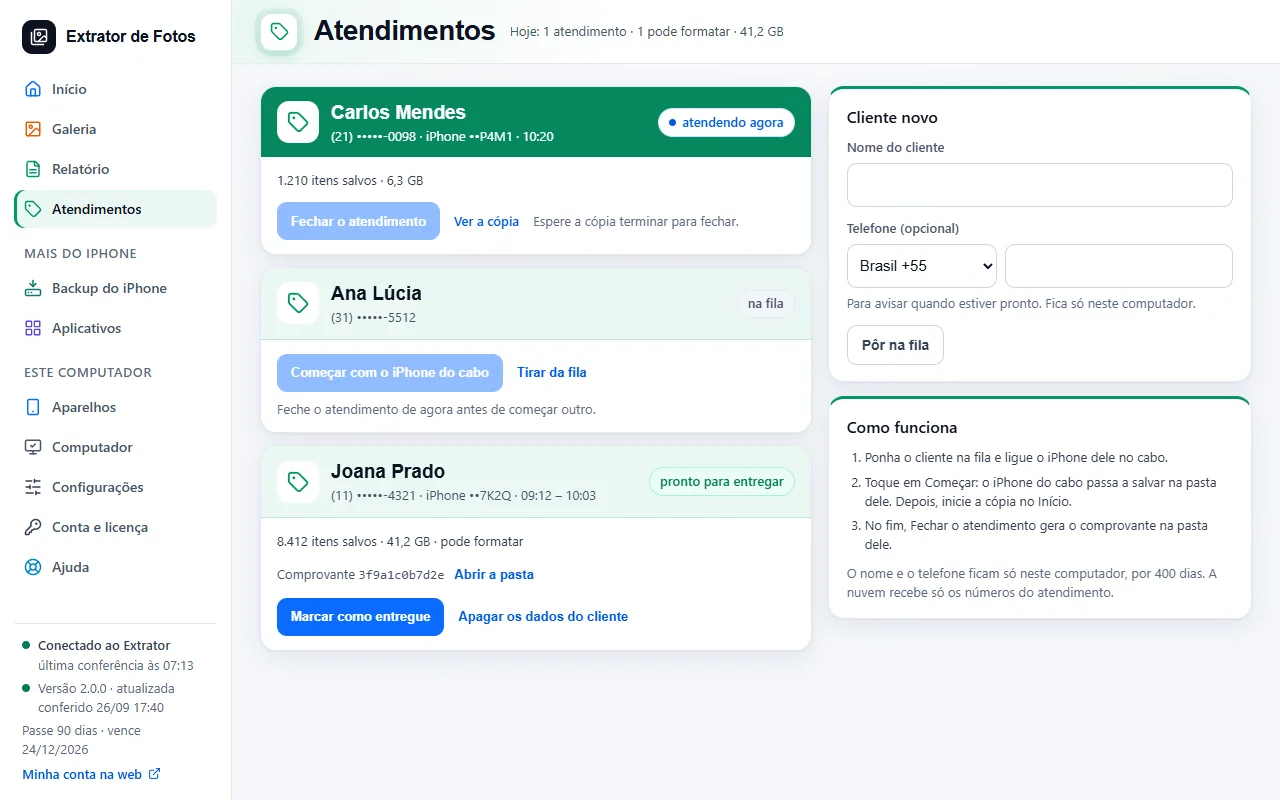
Step by step
The “Customers” screen only appears on the plan that has assistance mode. On another plan, the program shows “See the plans”.
Put the customer in the queue (“Add to the queue”), with the name and, if you want, the phone number, and plug their iPhone into the cable.
Tap “Start with the iPhone on the cable”: this only links the iPhone to their folder. Then start the copy: in Simple mode, tap “Save everything”; in Full mode, “Start”, in Step 1. The copy, iCloud and the report go to their folder.
At the end, “Finish the visit” creates the receipt in their folder. Then, “Mark as handed back”.
To start or finish a service, the copy has to be stopped. Each iPhone has only one active service at a time: finish the previous one before starting another.
The name and phone number stay only on this computer, for 400 days; after that, the program deletes them by itself, the same way as “Delete the customer's details”. The cloud only receives the numbers of the service, without the customer's name or their iPhone's name.
“Delete the customer's details” changes the name to “Deleted customer” and removes the phone number, also in the folder name: it becomes “<date> Cliente apagado (••last digits of the phone)”. The service stays in the day's report, and the photos in the folder are not touched. Someone who hasn't started yet leaves the queue with “Remove from the queue”.
If an error shows up
The code shows up on the program's screen. Each article has the cause and the fix.
More in Account and license
- Activate the license on the computer
- You reformatted or switched computers
- Lost, stolen, or sold computer
- Payment and refund
- How billing works
- What stays on the computer and what goes to the cloud
- Creating the account inside the program
- The cloud does not respond, or the computer has no internet
- The program went back to the free plan
- Changed iPhones? Free up the spot on the license
Still not fixed? Contact support
The team replies by email and in the customer area. In the program: Help. The error code goes along.