What stays on the computer and what goes to the cloud
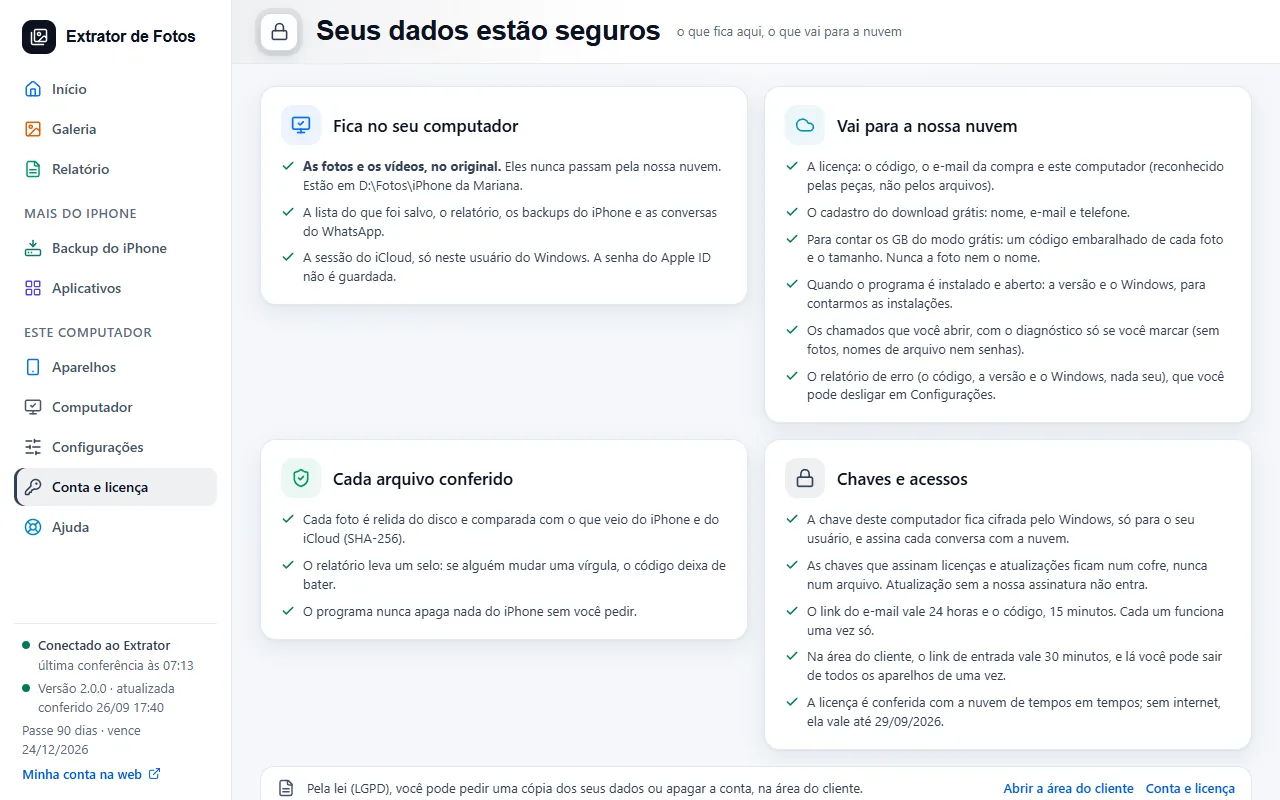
Your photos never leave your computer. The cloud keeps the license, your registration, and whatever you send to support.
Step by step
Photos and videos stay on your computer, in the original, in the folder you chose. They never go through our cloud.
The cloud keeps the license (the code, the purchase email, and the computer, recognized by its hardware and not by its files) and your account registration, done in the program.
To count the GB in free mode, only a scrambled code for each photo and its size are sent; never the photo or its name.
The error report includes the code, the version, and the Windows version. With automatic sending turned off (the default for new installs), it only goes out when you click Send it to us; you can change this in Settings. The one exception is the email notice: when it's on, only the fact that the copy finished and how many items were saved goes out, so the email can reach you. Under Brazil's data protection law (LGPD), you can request a copy of your data or delete your account in the customer area.
The program's errors reach us anonymously, to improve the program: only the error code, the screen, the version, Windows and the device model and iOS. No photos, no names and nothing that identifies you, and nothing linked to your account.
More in Account and license
- Activate the license on the computer
- You reformatted or switched computers
- Lost, stolen, or sold computer
- Payment and refund
- How billing works
- Creating the account inside the program
- Assistance mode: one service per customer
- The cloud does not respond, or the computer has no internet
- The program went back to the free plan
- Changed iPhones? Free up the spot on the license
Still not fixed? Contact support
The team replies by email and in the customer area. In the program: Help. The error code goes along.