Duplicate photos and how much space you would get back
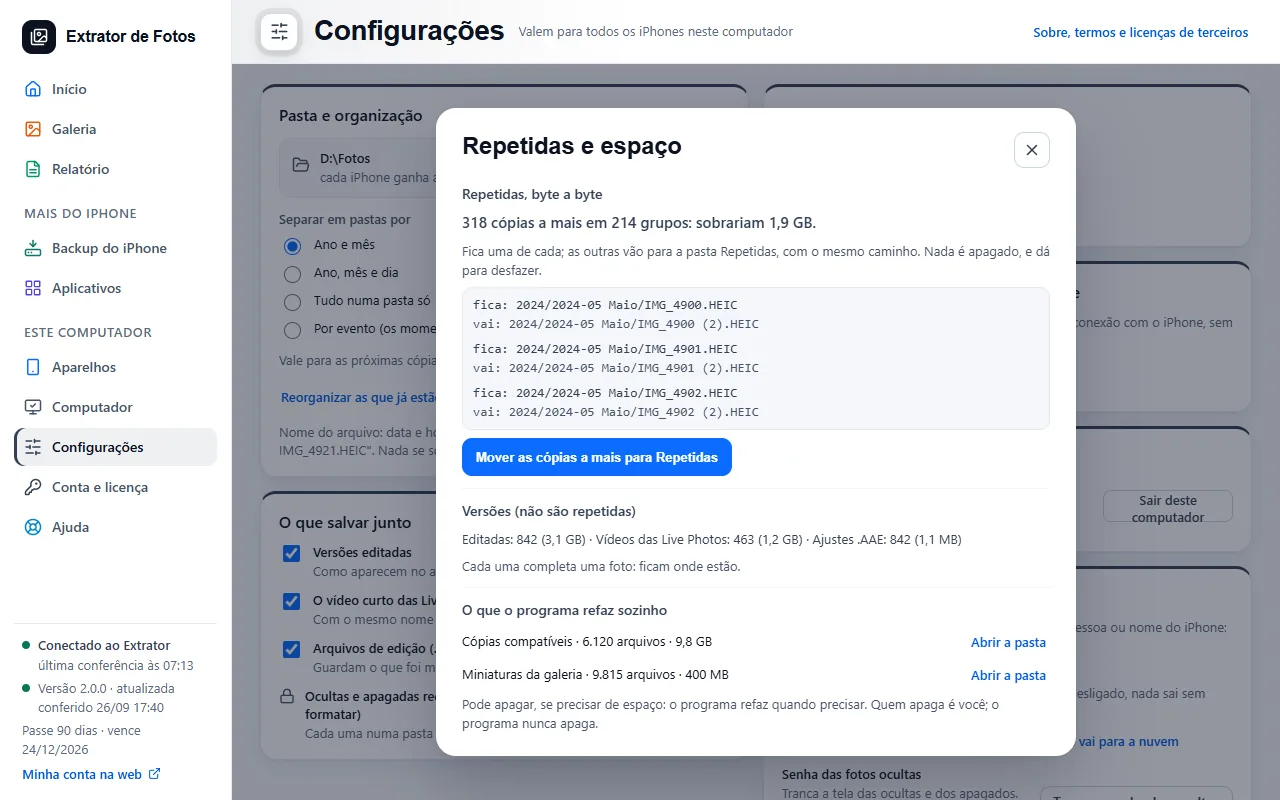
The program finds identical copies, byte by byte, and shows the space. Nothing is deleted: the extra copies move to a folder, and you can undo it.
Step by step
In “Settings”, under “Folder and organization”, next to “Reorganize the ones already saved…”, open “Duplicates and space…”. A dialog opens, and the program searches without changing anything.
Only an identical photo, byte by byte, counts as a duplicate. The edited version, the Live Photo video and the .AAE adjustments are versions: they show up separately and stay where they are.
The screen says how many extra copies there are and how much space would be left.
To tidy up, use “Move the extra copies to Repetidas”: one of each stays, and the others go to the Repetidas folder, with the same path. Nothing is deleted, and you can undo it.
The program rebuilds the compatible copies and the gallery thumbnails on its own. “Open the folder” shows where they are; if you need space, you are the one who deletes.
More in Copy the photos
- Save everything from the iPhone
- Open HEIC photos and HEVC videos in Windows
- Copying stops midway
- The photo arrives with gray areas or corrupted
- Copying is slow
- Copying keeps going on its own until it finishes
- Almost done: burst photos and duplicates
- The program is reading the iPhone's photo list
- The drive got full in the middle of the copy
- What is left after copying
- Sort the photos by event
- What each number means
Still not fixed? Contact support
The team replies by email and in the customer area. In the program: Help. The error code goes along.