Seeing what is on the iPhone, before copying
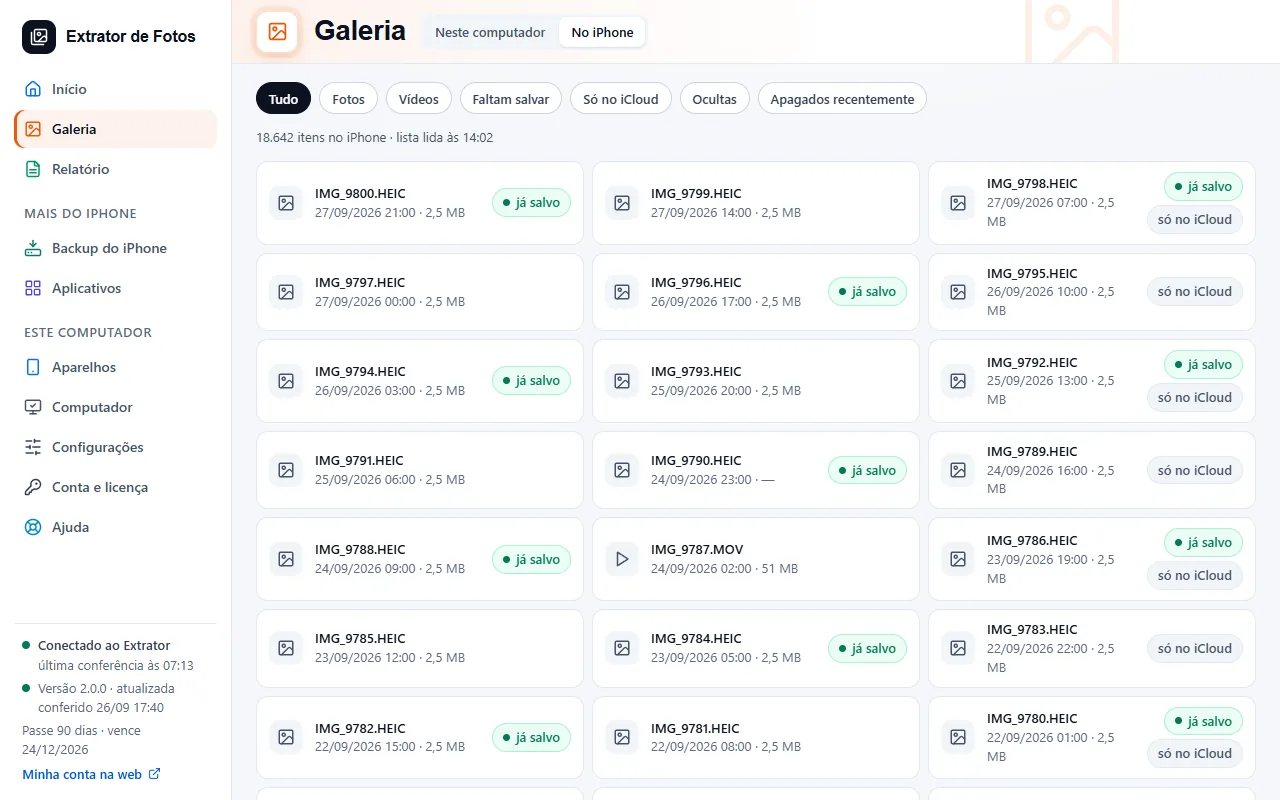
In iPhone photos, the Library shows what is on the connected device, with the thumbnail of each photo, and says what was already saved and what is only in iCloud. It only shows: it does not copy or delete anything.
Step by step
Open “iPhone photos” from the menu, or the “Photos on the iPhone” card in the Toolbox. The Library shows what is on the connected iPhone, with how many items there are and the time the list was read.
Each square shows the thumbnail the iPhone itself keeps, read over the cable without copying the photo, and the mark for “already saved” on this computer or “only in iCloud”. With the iPhone off the cable, the thumbnails that already came stay.
The filters split “Photos”, “Videos”, “Not saved yet”, “Only in iCloud”, “Hidden” and “Recently Deleted”, each with how many items it has. Hidden and deleted items ask for the same password as the Gallery.
The list comes in pages: use “Previous” and “Next” to move through it.
Without an iPhone whose list was read, the screen says: Connect the iPhone and unlock it: the list of what is on it shows up here, before copying.
This screen only shows. To copy what is missing, use “Save everything”, and the “Not saved yet” filter keeps getting emptier. The Gallery shows what is already on this computer.
More in Gallery
Still not fixed? Contact support
The team replies by email and in the customer area. In the program: Help. The error code goes along.