Changed iPhones? Free up the spot on the license
The free plan copies from 1 iPhone or iPad; the paid plans have no limit. In My license you see the ones the license has already copied and remove the old one: the spot comes back, and the photos already copied stay.
Step by step
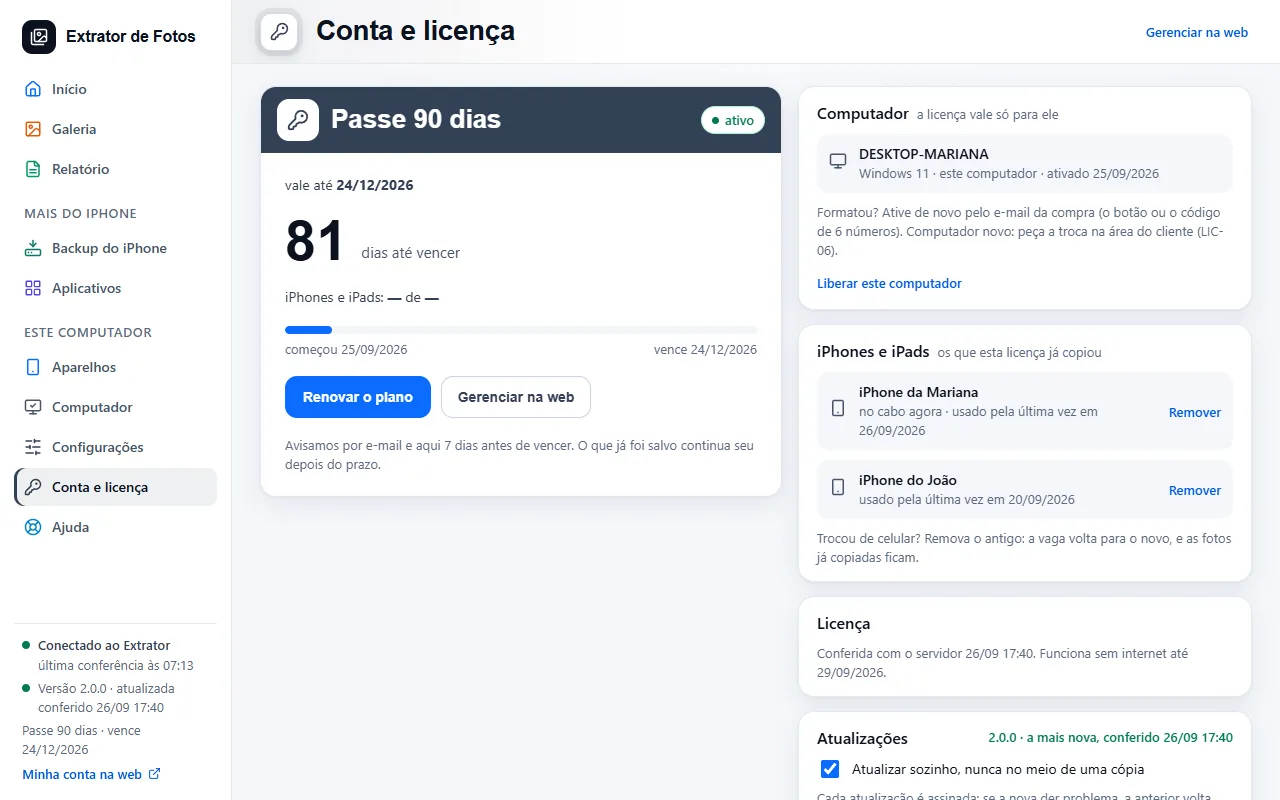
Open “My license” (in older versions, “Account and license”). The devices box shows the ones this license has already copied: the name of each, the date it was last used and, on the one that is connected, “on the cable now”.
On the free plan, one device too many does not start the copy (code LIC-18), and nothing is deleted.
Changed phones? Remove the old one: its spot goes to the new one, and the photos already copied stay. Tap “Remove” next to the old device and confirm.
The spot comes back right away. The photos already copied stay on the computer, and your account's email gets a notice about the removal.
Removals have a limit per period (the customer area shows it). Past that, the button disappears and the screen shows the date when you can remove another one (code LIC-19).
The list comes from the internet. Without a connection, the screen shows the cause, with the code, and the “Try again” button, instead of an empty list.
If an error shows up
The code shows up on the program's screen. Each article has the cause and the fix.
More in Account and license
- Activate the license on the computer
- You reformatted or switched computers
- Lost, stolen, or sold computer
- Payment and refund
- How billing works
- What stays on the computer and what goes to the cloud
- Creating the account inside the program
- Assistance mode: one service per customer
- The cloud does not respond, or the computer has no internet
- The program went back to the free plan
Still not fixed? Contact support
The team replies by email and in the customer area. In the program: Help. The error code goes along.