Delete through the program (for now, only the dry run)
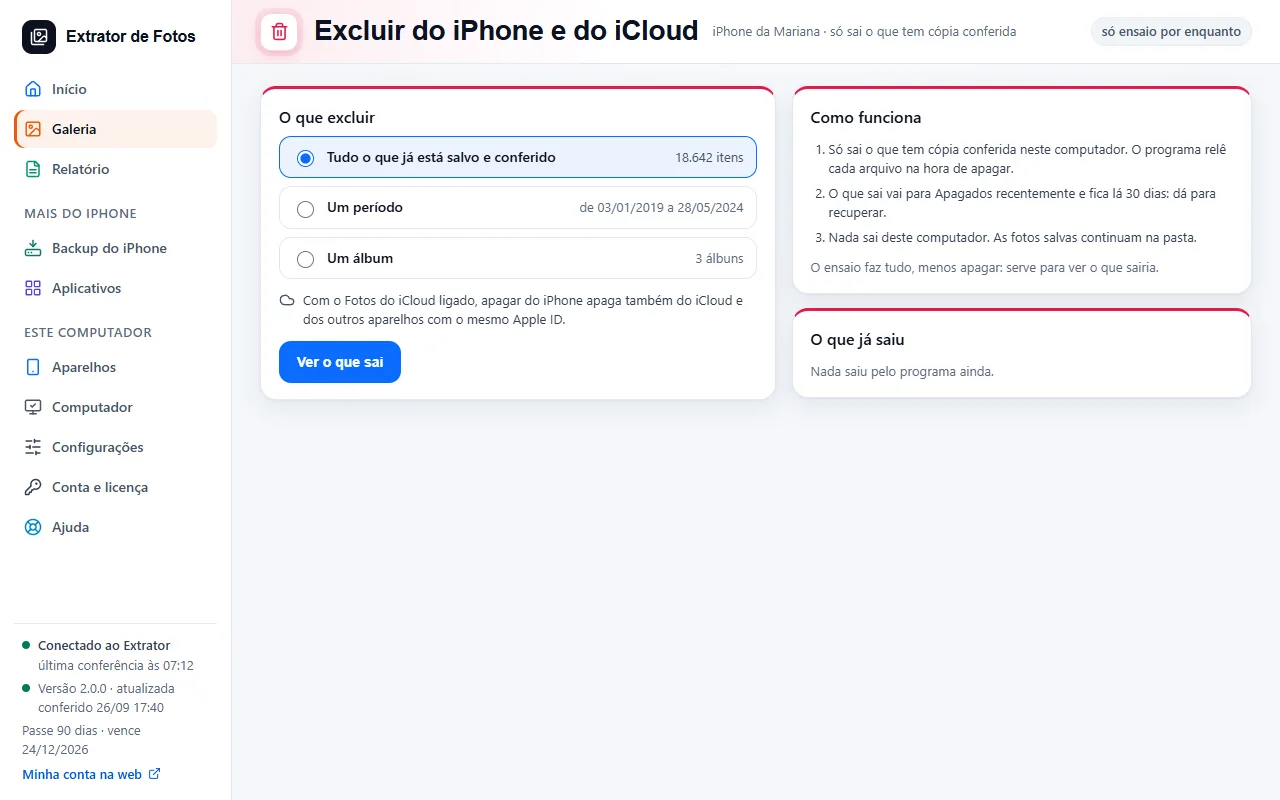
The dry run shows what would be removed from the iPhone and iCloud, without deleting anything.
Step by step
Open Delete from iPhone and iCloud and choose: everything already saved and verified, a date range, or an album.
Click See what gets removed: the dry run shows exactly what would be removed.
Nothing is deleted in the dry run. Only what has a verified copy on this computer gets removed, and nothing is removed from this computer.
If an error shows up
The code shows up on the program's screen. Each article has the cause and the fix.
More in Delete and erase
- When it's safe to erase the iPhone
- Before erasing: what isn't photos
- Have a copy of your photos that doesn't depend on iCloud
- Recovering deleted photos: what comes back and what doesn't
- Why is my iPhone still full after copying and deleting the photos?
- The transfer receipt
- The Before formatting list: what each color means
- Freeing up space on the iPhone
Still not fixed? Contact support
The team replies by email and in the customer area. In the program: Help. The error code goes along.