Before erasing: what isn't photos
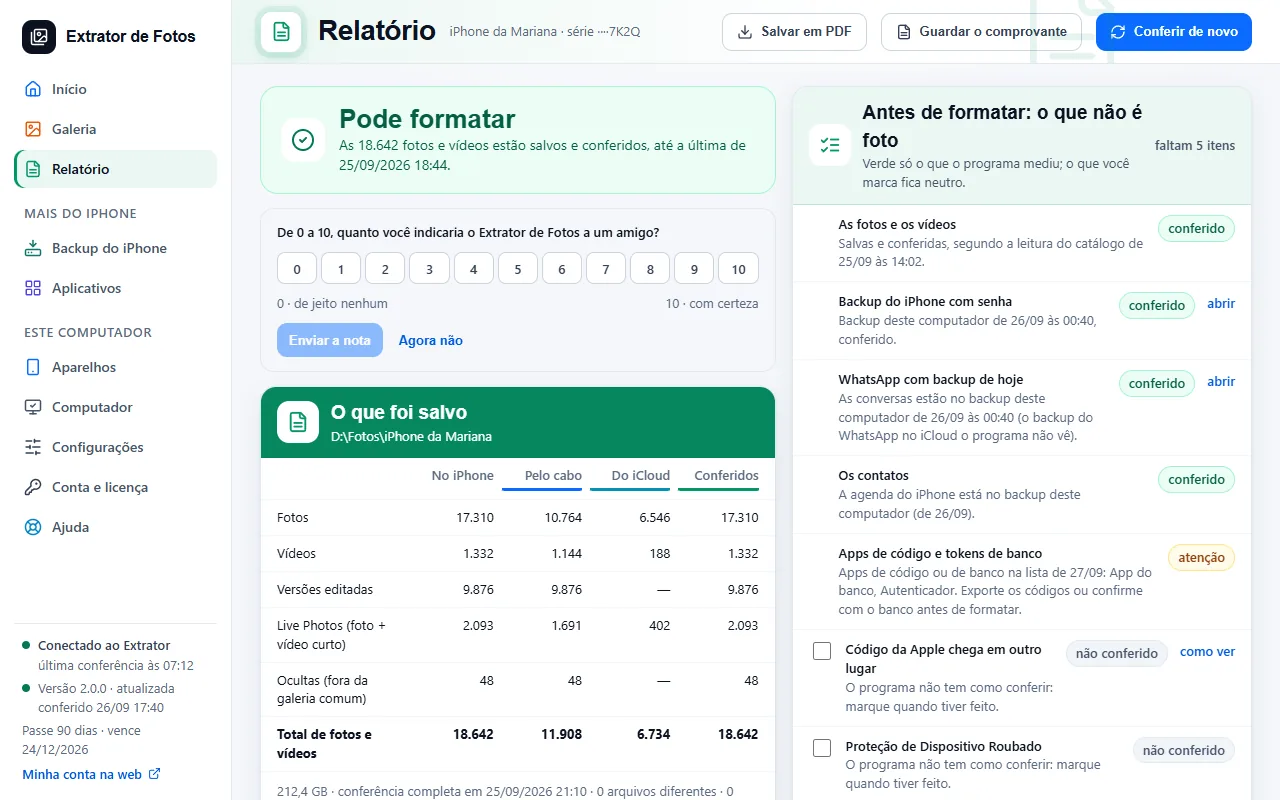
Things that disappear when you erase the iPhone. The Report has the list to check off.
Step by step
Check where Apple's code arrives (a trusted phone number or another device): without it, you're locked out of your own account.
Selling it or giving it away? Sign out of iCloud and turn off Find My iPhone first, or the device stays locked for whoever gets it.
Move your authenticator apps and bank tokens before erasing.
Check the WhatsApp backup, the password-protected iPhone backup, the virtual SIM (eSIM), and the notes that aren't in iCloud.
If an error shows up
The code shows up on the program's screen. Each article has the cause and the fix.
More in Delete and erase
- When it's safe to erase the iPhone
- Delete through the program (for now, only the dry run)
- Have a copy of your photos that doesn't depend on iCloud
- Recovering deleted photos: what comes back and what doesn't
- Why is my iPhone still full after copying and deleting the photos?
- The transfer receipt
- The Before formatting list: what each color means
- Freeing up space on the iPhone
Still not fixed? Contact support
The team replies by email and in the customer area. In the program: Help. The error code goes along.