iPhone backup
Apps, conversations, settings, and notes: everything the iPhone keeps, on your drive.
Step by step
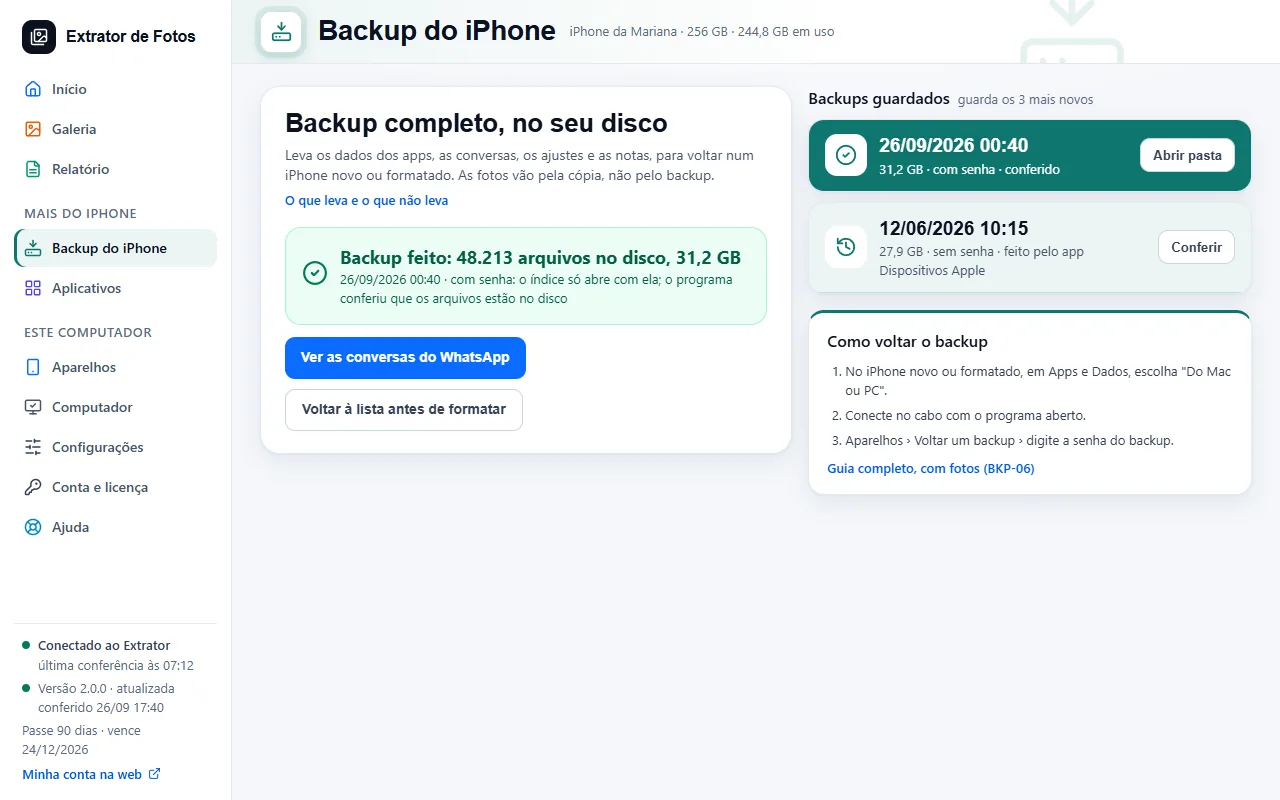 Make a full backup of the iPhoneA copy of the whole iPhone, on the drive you choose. The photos are already in the photos folder.4 steps
- Restore the backup on a new iPhoneStill being tested in the program: it arrives after it is tested on a test device. Until then, the backup stays on your drive.3 steps
- What the iPhone backup includes and what it doesn'tThe backup keeps what's on the iPhone itself. What's already in iCloud, Face ID, and Apple Pay are left out.6 steps
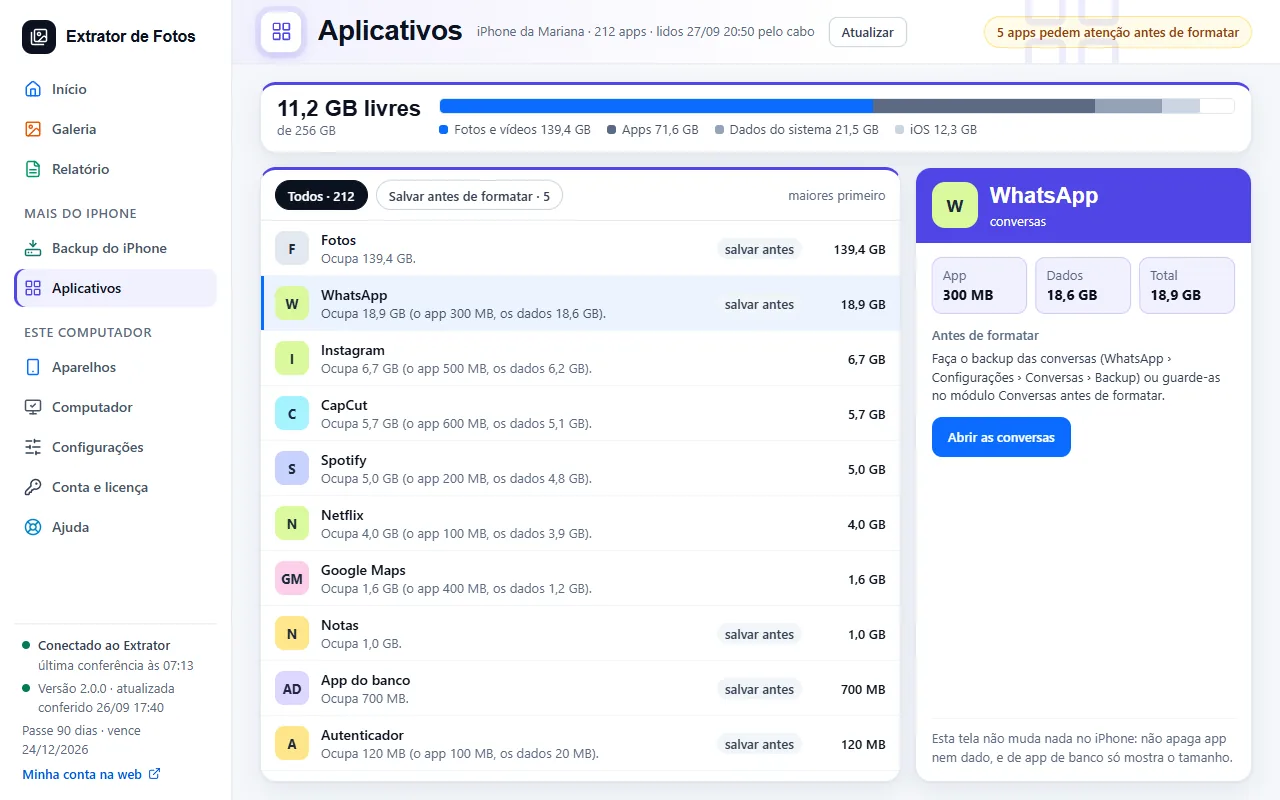 Seeing the iPhone's apps and its spaceThe list of apps, from largest to smallest, and which ones need attention before formatting.5 steps
Error codes in this topic
The code shows up on the program's screen. Each one has the cause and what to do.
BKP-01“The backup session failed”BKP-02Not enough space on the computer for the iPhone backupBKP-03The iPhone backup is corrupted or incompatibleBKP-04I forgot the encrypted backup passwordBKP-05I made a backup and the photos aren't in itBKP-06The backup won't restore to another iPhoneBKP-07The iPhone or iPad asks for the passcode before the backup startsBKP-08“The name you typed doesn't match: nothing was restored”BKP-09“Restoring the backup can't stop halfway”BKP-10A control file of the backup is missingBKP-11Some backup files are missing or cut shortBKP-12The backup's index is gone or does not openBKP-13The backup stopped before it finishedBKP-14Leftovers of an interrupted backup remainBKP-15The repair could not write to the backup's diskBKP-16The backup could not be set asideBKP-17The iPhone or iPad on the cable is not the owner of this backupAPP-01“This app doesn't allow copying its documents over the cable”APP-02“This app is no longer on the iPhone”APP-03“The iPhone didn't remove the app. Nothing was deleted”APP-04“The name you typed doesn't match: nothing was removed”APP-05“The documents copy was interrupted”APP-06“This feature isn't available in this version yet”APP-07“This iPhone isn't paired with this computer”APP-08“This iPhone was removed from this computer”APP-09“The pairing code expired or was already used”APP-10“Windows doesn't accept this file's name: it wasn't received”APP-11“The app doesn't take this type of file”APP-12“This file is too large to send through the app”APP-13“The file arrived different from how it left the iPhone and wasn't saved”APP-14“Too many connections to this computer at once”APP-15“The computer didn't open the port to receive from the iPhone”APP-16“This computer already has as many iPhones paired through the app as the plan allows”APP-17“The iPhone app isn't available in this version yet”APP-18“The iPhone or iPad didn't answer the request for the apps”APP-19“The iPhone or iPad didn't answer when removing the app”APP-20“The iPhone or iPad doesn't allow deleting apps. Nothing was deleted”APP-21“This app's documents didn't all arrive: the app wasn't removed”APP-22“The confirmation you typed doesn't match: nothing was removed”APP-23“The removal request was sent, but the iPhone or iPad hasn't confirmed yet whether the app left”APP-24“The file didn't fully reach the app on the iPhone or iPad”APP-25“This app doesn't receive files over the cable”APP-26“This iPhone or iPad's app list hasn't been read yet”APP-27“This file isn't an app the iPhone or iPad can install”APP-28“This app isn't signed for this iPhone or iPad”APP-29“This app doesn't work on this iPhone or iPad”APP-30“The iPhone or iPad didn't finish installing the app”APP-31“The iPhone or iPad doesn't allow installing apps. Nothing was installed”APP-32“This app is already on the iPhone or iPad. Nothing was installed”TRF-01“Transfer to another iPhone is still in testing”TRF-02“The old iPhone's backup isn't ready yet”TRF-03“Changing the backup password here is still in testing”TRF-04“The backup password is missing”TRF-05“The automatic backup was left for later: another task is using the device”LOJ-01The App Store did not respondLOJ-02The App Store's answer came in a format the program does not knowAPL-01A code Apple does not publish (for example 4000, 1100, -1 or 2003) when updating or restoringAPL-02Error 9, 4005, 4013 or 4014 when updating or restoringAPL-03Error 10 when updating or restoringAPL-04Error 14 when updating or restoringAPL-05Error 53 when updating or restoringAPL-06Error 17, 1109, 1638, 1639, 3194, 3200, 3000 to 3020 or 3100 to 3999 when updating or restoring, or the message “There was a problem downloading the software” or “This device isn't eligible for the requested build”APL-07Error 1671 when updating or restoringAPL-08Error 4037 when updating or restoringAPL-09Error 2, 4, 6, 1611, 9006, 1630 to 1641, 3000 to 3999 or 9000 to 9999 when updating or restoringAPL-10Error 13, 1600, 1601, 1602, 1603, 1604, 2000, 2001, 2002, 2005, 2006, 2009 or 1643 to 1650 when updating or restoring, or the message “Invalid Response”APL-11Error 1, 3, 11, 12, 16, 20, 21, 23, 26, 27, 28, 29, 34, 35, 36, 37, 40, 56, 1002, 1004, 1011, 1012, 1014, 1667 or 1669 when updating or restoringAPL-12Error 1015 when updating or restoring, or the message “The required resource can't be found”APL-13The message “Cellular Update Failed” or “Apple Pay Unavailable” when updating or restoringAPL-20The device stops with code 25 during a backup or when restoring a backup, or the message “Restore from iTunes Backup is unavailable while an iCloud Restore is in progress”APL-21The device stops with code 205 during a backup or when restoring a backup, or the message “Error moving items from snapshot”APL-22The message “Digest didn't match” or “Multiple errors downloading files” during a backup or when restoring a backupAPL-30The message “This accessory may not be supported” with the cable connectedAPL-31The message “Liquid Detected in Lightning Connector” or “Liquid Detected in USB-C Connector” with the cable connectedAPL-32The message “the Apple Mobile Device Service is not started” with the cable connectedAPL-33The message “doesn't recognize your iPhone” or “isn't recognized” with the cable connectedAPL-34Error 2 with the cable connected, or the message “Apple Application Support was not found”APL-35Error 0xC000007B with the cable connected, or the message “The application was unable to start correctly”APL-36Error 0xE8000015 or 0xE8000065 with the cable connected, or the message “could not connect to this”APL-37The message “connection to the iPhone was reset” or “iPhone has timed out” with the cable connectedAPL-38The message “Trust This Computer” with the cable connectedAPL-40Error -54 or 54 when syncing, or the message “An unknown error occurred (-54)”APL-41Error -5000, -69, 13010 or 13014 when syncingAPL-42Error -50 when syncing, or the message “cannot be synced” or “An unknown error occurred”APL-43The message “sync session failed to start” or “sync session could not be started” when syncing
Still not fixed? Contact support
The team replies by email and in the customer area. In the program: Help. The error code goes along.