What is left after copying
When the copies finish and some photos are still missing, the program says what each one is, why it was left and whether you can leave it. The decision to erase is yours.
Step by step
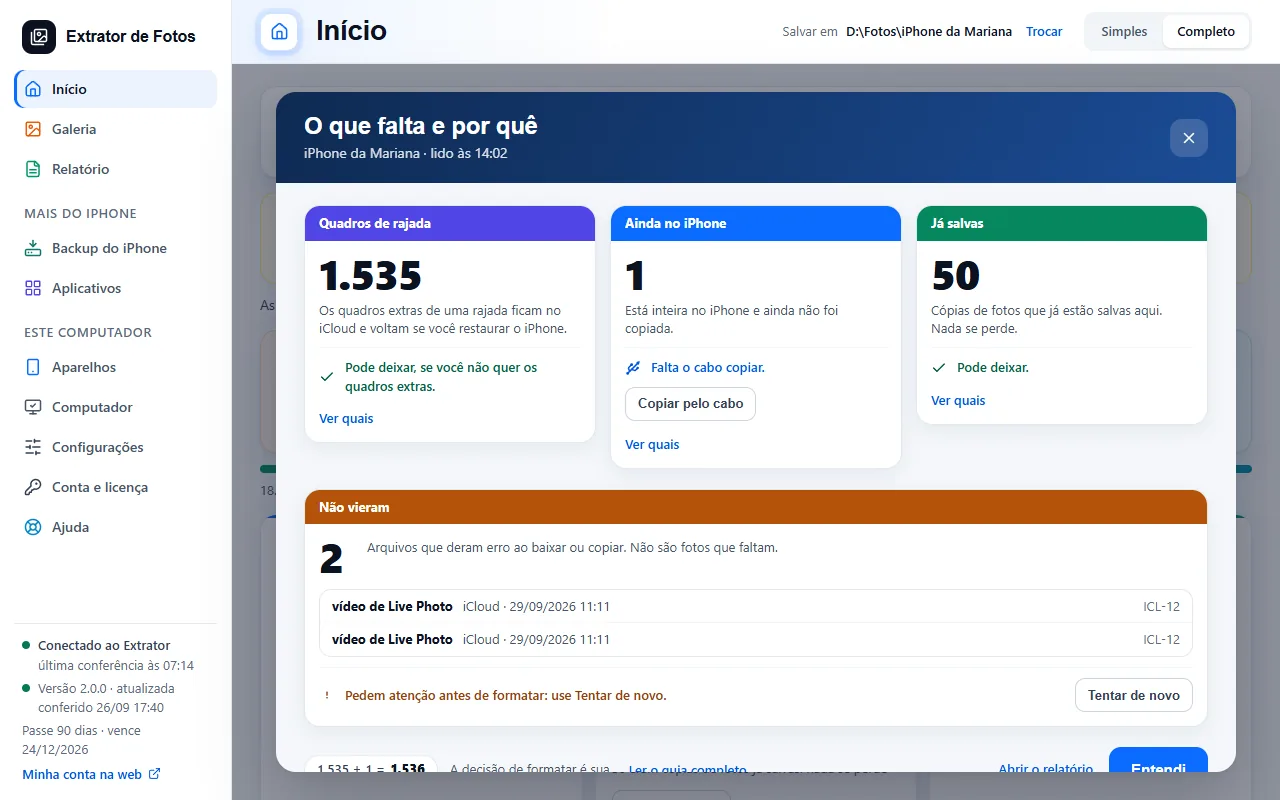
When the copies finish and something is left, Home says how many are missing and in which groups, with the “See what's left” button. The card of each step shows the result of the round (for example, how many were downloaded in it), and no longer the progress.
“See what's left” opens the “What's left and why” panel: one card per group, with the number, a line with the reason and another saying whether you can leave them. At the bottom, the count that adds up, like 1,535 + 1 = 1,536. In each card, “See which” shows the list, item by item.
“Burst frames”: the extra frames of a burst stay in iCloud and come back if you restore the iPhone. You can leave them, if you don't want the extra frames.
“Already saved”, after the missing ones: they are copies of photos that are already saved on this computer (the same original, kept twice on the iPhone). They count as saved and are not in the count of what is missing; Home says how many there were, and that nothing is lost. In “See which”, each line shows the photo that is already saved.
“Still on the iPhone”: the photo is whole on the iPhone and has not been copied yet. The cable still has to copy it: tap “Copy by cable”.
“Repeats without a saved match” and “Need attention” only appear when there are photos in them. The first is a photo the iPhone marked as a repeat, without the other photo saved here; the second is one the program cannot explain (the code ICL-09). Both need attention before you erase: tap “Look again” and check in the Photos app, or on icloud.com, whether the photo is there.
“Did not arrive” is kept apart and out of the count: these are files that failed to download or copy, such as the video of a Live Photo or the edited version of a photo (the code ICL-12). The photo itself is saved, but while the file has not arrived the report does not release “Safe to erase”. Tap “Try again” to fetch it again; if iCloud does not deliver it after the attempts, the program says the Live Photo was saved without its short video.
In Simple mode, the screen says “The copy finished”, the result of each step and what was left out, with the same “See what's left” button. The Report repeats the same summary.
If an error shows up
The code shows up on the program's screen. Each article has the cause and the fix.
More in Copy the photos
- Save everything from the iPhone
- Open HEIC photos and HEVC videos in Windows
- Copying stops midway
- The photo arrives with gray areas or corrupted
- Copying is slow
- Copying keeps going on its own until it finishes
- Almost done: burst photos and duplicates
- Duplicate photos and how much space you would get back
- The program is reading the iPhone's photo list
- The drive got full in the middle of the copy
- Sort the photos by event
- What each number means
Still not fixed? Contact support
The team replies by email and in the customer area. In the program: Help. The error code goes along.