The program is reading the iPhone's photo list
Before copying, Simple mode reads the iPhone's photo list to know what is already saved and what is missing. You can ask for Save everything right away: it starts on its own when the reading ends.
Step by step
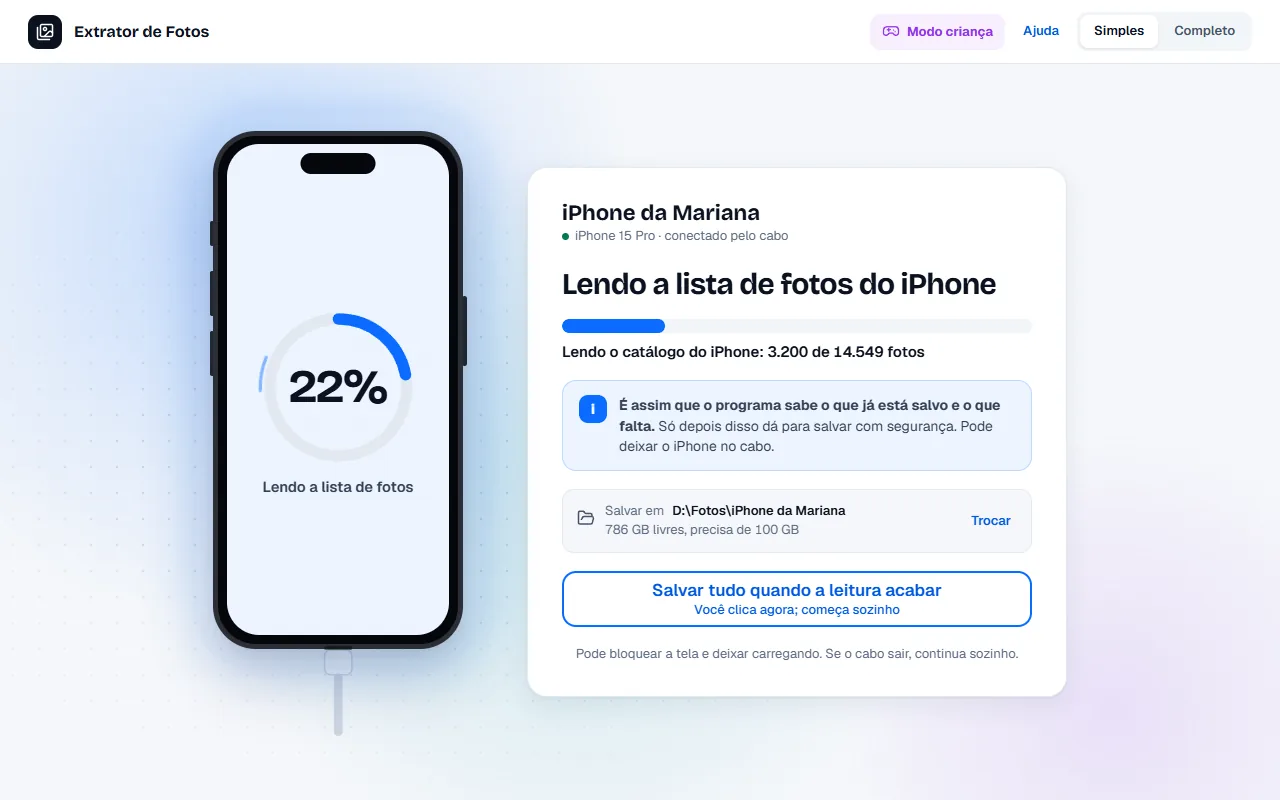
When the program needs to read the iPhone's photo list and is not copying yet, Simple mode shows “Reading the iPhone's photo list” and says which part of the reading it is in: first, the bar with how much has come over the cable so far (for example, 596 MB of 3.6 GB) and an estimate of what is left; then “Checking that the catalog arrived complete…”, “Reading the iPhone catalog: 3,200 of 14,549 photos” and “Listing the iPhone folders: 12 read”.
The blue box explains why: “This is how the program knows what is already saved and what is missing. Only after this can it save safely. You can leave the iPhone on the cable.” Copying only starts when the reading ends.
You don't need to wait in front of the screen: click “Save everything when the reading ends” (the button says, below it, “Click now; it starts on its own”). The program keeps your request and starts copying as soon as the list arrives.
After the click, the button gives way to “It will start on its own when the reading ends” and “Nothing more to do”. If you change your mind, click “Cancel”: the copy does not even start.
Just below, the screen shows the folder where the photos will be saved, how much free space it has and how much the program needs. “Change” opens Settings so you can pick another folder.
At the bottom of the screen, the note says: “You can lock the screen and leave it charging. If the cable comes out, it continues on its own.” If the button is grayed out, the sentence right below it gives the reason.
In Full mode, Home shows the same reading with the title “Checking the iPhone…”.
If the iPhone is updating its photo list (usually iCloud syncing), the screen shows “Waiting for the iPhone to finish updating its photo list…” and the reading starts on its own when it stops. If the copied list comes out incomplete because of this, the code CON-24 appears and the program tries again on its own; after 3 times in a row, the screen says “The program stopped trying on its own. When the iPhone is done, click Try again.” If the iPhone locks during the reading, the large notice “Unlock the iPhone” appears: “Unlock the iPhone (with the passcode or Face ID) and keep the screen on.” While it is locked, the waiting time doesn't count; as soon as you unlock it, the reading continues on its own, from where it stopped. After 10 minutes locked, the code CON-25 appears: nothing was lost, and the reading continues when you unlock it. If the reading does not move for about 45 seconds with the iPhone unlocked (for example, “Trust This Computer?” left unanswered), the bar gives way to instructions: keep the iPhone unlocked, tap Trust and, if needed, change the cable or the port. The program tries again on its own every 30 seconds.
If an error shows up
The code shows up on the program's screen. Each article has the cause and the fix.
More in Copy the photos
- Save everything from the iPhone
- Open HEIC photos and HEVC videos in Windows
- Copying stops midway
- The photo arrives with gray areas or corrupted
- Copying is slow
- Copying keeps going on its own until it finishes
- Almost done: burst photos and duplicates
- Duplicate photos and how much space you would get back
- The drive got full in the middle of the copy
- What is left after copying
- Sort the photos by event
- What each number means
Still not fixed? Contact support
The team replies by email and in the customer area. In the program: Help. The error code goes along.