Hidden photos, deleted items and the password
Hidden photos and the ones that were in Recently Deleted stay out of the regular gallery, on a screen with a password. The password locks the screen, not the files: forgetting it never costs you a photo.
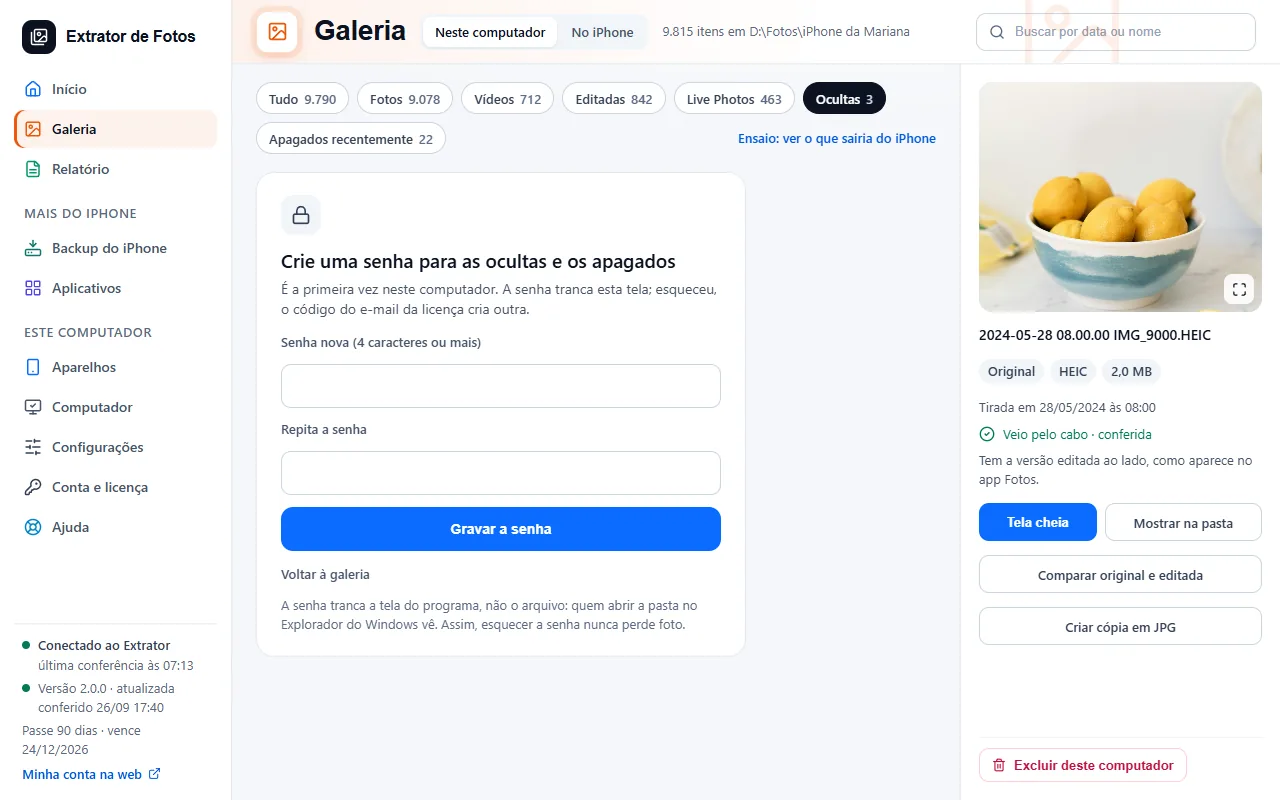
Step by step
In the Gallery, the “Hidden” and “Recently Deleted” filters show what was like that on the iPhone on the day of the copy. They stay out of the regular gallery and out of the month count.
The first time on this computer, the screen says “Create a password for hidden and deleted items”. Pick a password of 4 characters or more, type it again in “Repeat the password” and tap “Save the password”.
The other times, the screen says “Hidden and deleted items need the password”. Type the password and tap “See hidden items”: they stay open until you close the program.
Forgot it? Tap “I forgot the password”: the program sends a 6-digit code to the license email. Type the code, tap “Check the code” and create the new password.
To change the password, open “Settings” and, in the “Privacy” section, tap “Change the hidden photos password”. Type the current one and the new one, or use “I forgot the current password” to get the code by email. The button only shows up after the password was created.
The password locks the program's screen, not the files: anyone who opens the folder in File Explorer can see them. That way, forgetting the password never costs you a photo.
More in Gallery
Still not fixed? Contact support
The team replies by email and in the customer area. In the program: Help. The error code goes along.